
Model in 3D with Claude
Claude can't draw a 3D model in a chat by itself, but it can with the right connector. Add PREVIS to Claude, describe what you need and watch it appear in your browser. It takes a few minutes to set up, and no 3D skills.
Set it up
- Open PREVIS, sign in and press Add MCP.
- Copy your private link.
- In Claude, open Settings, then Connectors, choose Add custom connector and paste it.
- Keep the PREVIS tab open while you work.
How Claude models
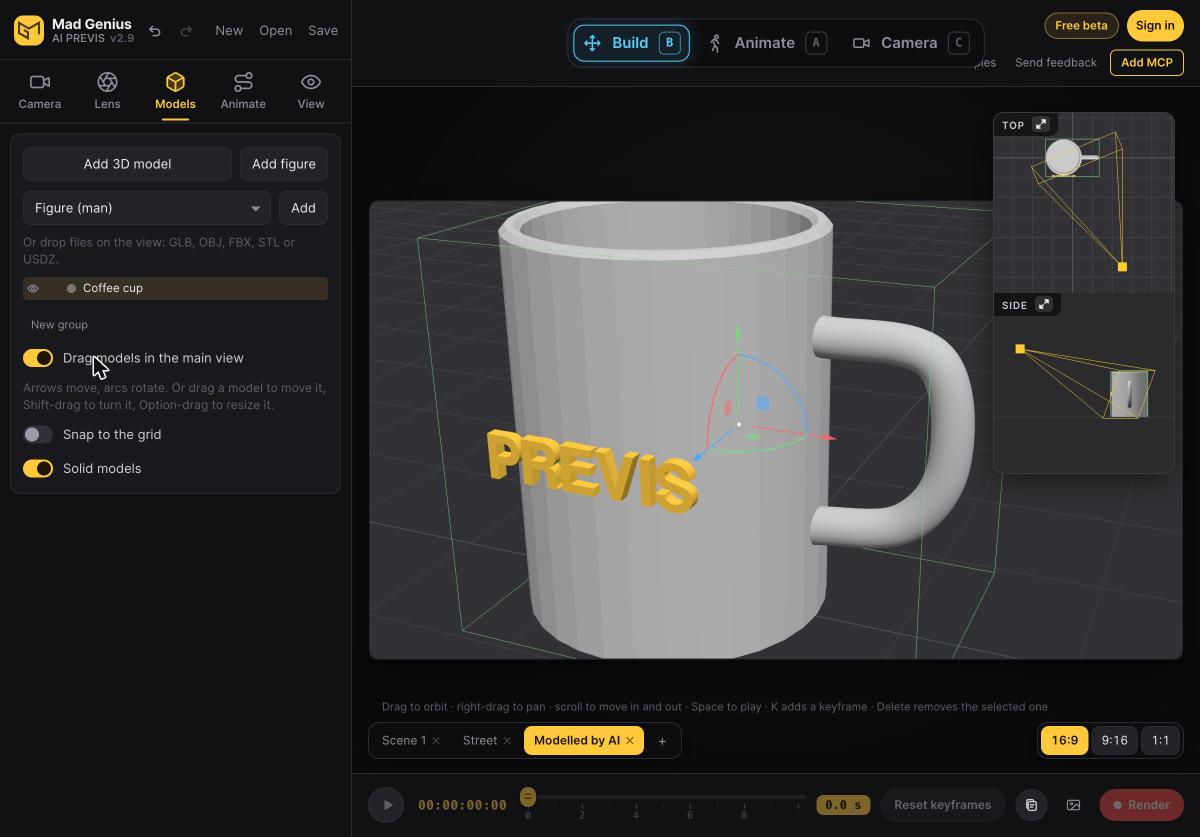
Claude works in steps, much as a 3D artist does. It starts from a simple form, then refines it. The cup above uses a hollowed cylinder, a tube for the handle and 3D text.
- Starting forms. Boxes, cylinders, cones, spun shapes, curved outlines with holes, tubes, freeform meshes, 3D text or any shape from the kit.
- Modelling steps. Select faces, edges or points, then move, scale, rotate, extrude, inset, delete, mirror, loop cut, bevel and smooth.
- Combining. Cut one shape from another, and join or separate models.
- Checking. It can view a model alone from the front, side, back and top, then fix what it sees.
Prompts to try
Model a director's chair: wooden frame, canvas seat and back, crossed legs.
Keep it real size. Check it from the front and side.
Model a vintage film camera on a tripod. Use simple forms and keep the
silhouette clear from 10 metres away.
Add a food truck to this street. It should have a service window and an
awning, and face the camera.
Get better results
- Give real sizes. "A 90 cm table" beats "a small table".
- Describe the silhouette. Shape matters more than surface detail.
- Ask it to check. "Look at it from the side and fix anything wrong."
- Give notes one at a time. "Make the handle thicker" works better than a long list.
What to expect
These models are made for blockouts. They're strong at clear shapes and props, and they aren't a replacement for a skilled artist's hero character. That's fine for reference: your video model adds the look. There's no manual modeller in PREVIS, so all modelling goes through your AI.
Using another AI? The same connector works with any app that takes MCP.
Questions
Can Claude make 3D models?
Yes, when it is connected to a 3D tool over MCP. In PREVIS it builds the model in your open browser tab.
Do I need a paid Claude plan?
You need a Claude plan that lets you add custom connectors. Check the current plans in Claude, as this can change.
Can I download the models?
Not as 3D files. PREVIS exports video, frames and prompts. Models stay in your scene, and you can save the scene to a file.
More guides
- A Blender alternative for Seedance
- Seedance camera control
- Previs for AI video
- How to block out a shot for AI video
- 3D MCP: control a 3D scene from your AI
- A Blender MCP alternative
- How to use reference videos in Seedance
- Free previs software
- Previs software compared
- Camera move library
- Tutorials with every prompt