
How we made the five-floor shot
One camera rising through five floors of a building, planned in PREVIS, built by Claude over MCP and rendered with Seedance 2.5. Every prompt we used is below.
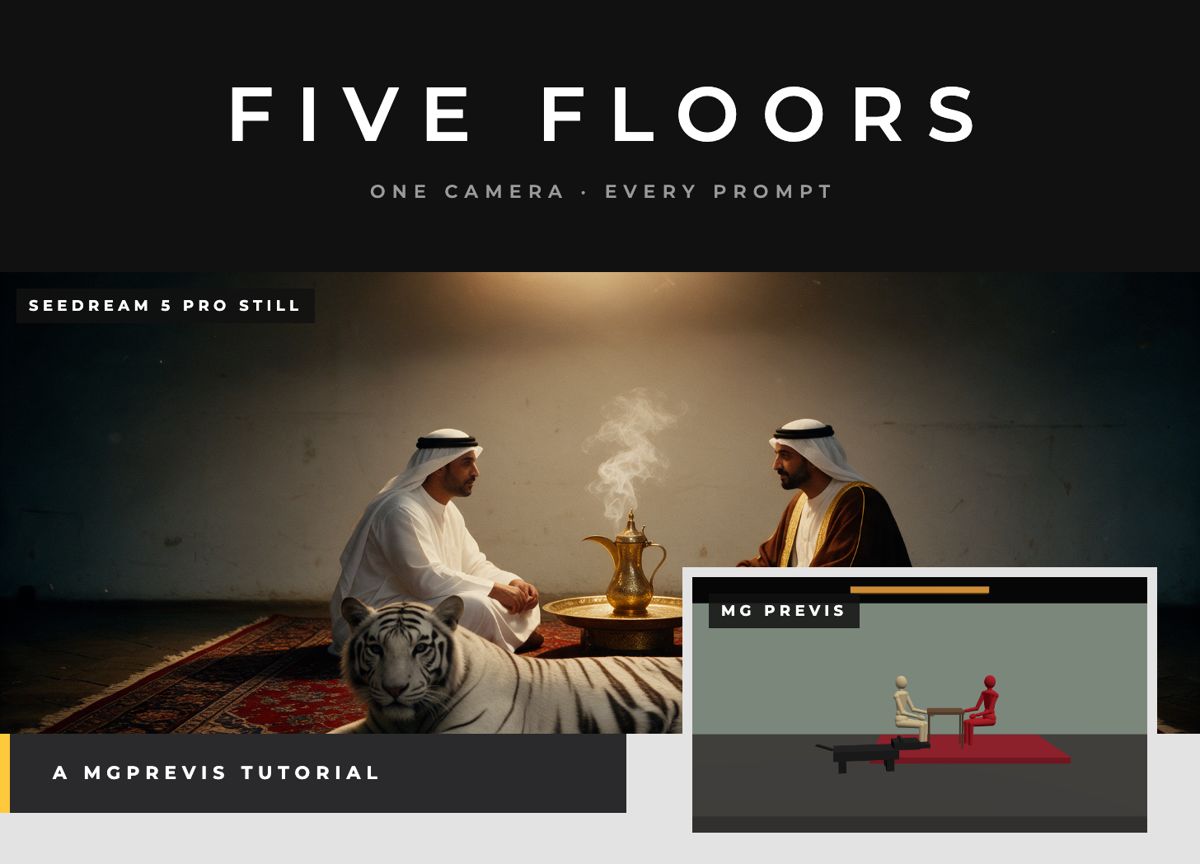
This is the shot people ask about most. A single 29-second take: the camera starts in a basement car park and cranes straight up through a majlis, a garage, a neon room and out onto a rooftop with a falconer and two Arabian horses.
Top: the blockout from PREVIS. Bottom: what Seedance 2.5 made from it.
Nothing in the final clip was left to chance in a prompt. The camera move, the framing of every floor and the timing were planned first in grey 3D, and the video model was given that plan to follow.
Here is the whole workflow, step by step.
What you need
- PREVIS at madgeniusprevis.com. It runs in your browser and is free during the open beta.
- Claude, or any AI app that takes MCP connectors.
- An image model for the stills. We used Seedream 5 Pro on Magnific.
- Seedance 2.5 for the video. We used it on Magnific too.
Step 1: Add MCP

Press Add MCP at the top right of the app and copy your private link. In Claude, open Settings, then Connectors, choose Add custom connector and paste it. Keep the app open in a tab: Claude builds the scene in it while you watch.
Step 2: Describe the building
Tell Claude what is on each floor and how the camera moves. You don't need exact measurements. Ours was along these lines (this is an example request, written for this post):
Build a five-floor building in PREVIS, seen front-on like a cross-section.
Ground floor: a white SUV and a man standing beside it.
Floor 2: a majlis, two men sitting on a carpet with a coffee pot, a tiger lying in front.
Floor 3: a car stopped at 45 degrees in an empty garage.
Floor 4: a dark room, one man on floor cushions, one at a small table.
Roof: a man between two horses.
One camera, eye level, 35 mm, rising straight up through every floor in 29 seconds.
Claude lays out the figures, cars, horses and floor slabs, sets the camera keyframes, then checks its own frames with the app's look tool and fixes what's off. Undo works on anything it does.
Step 3: Render the scene
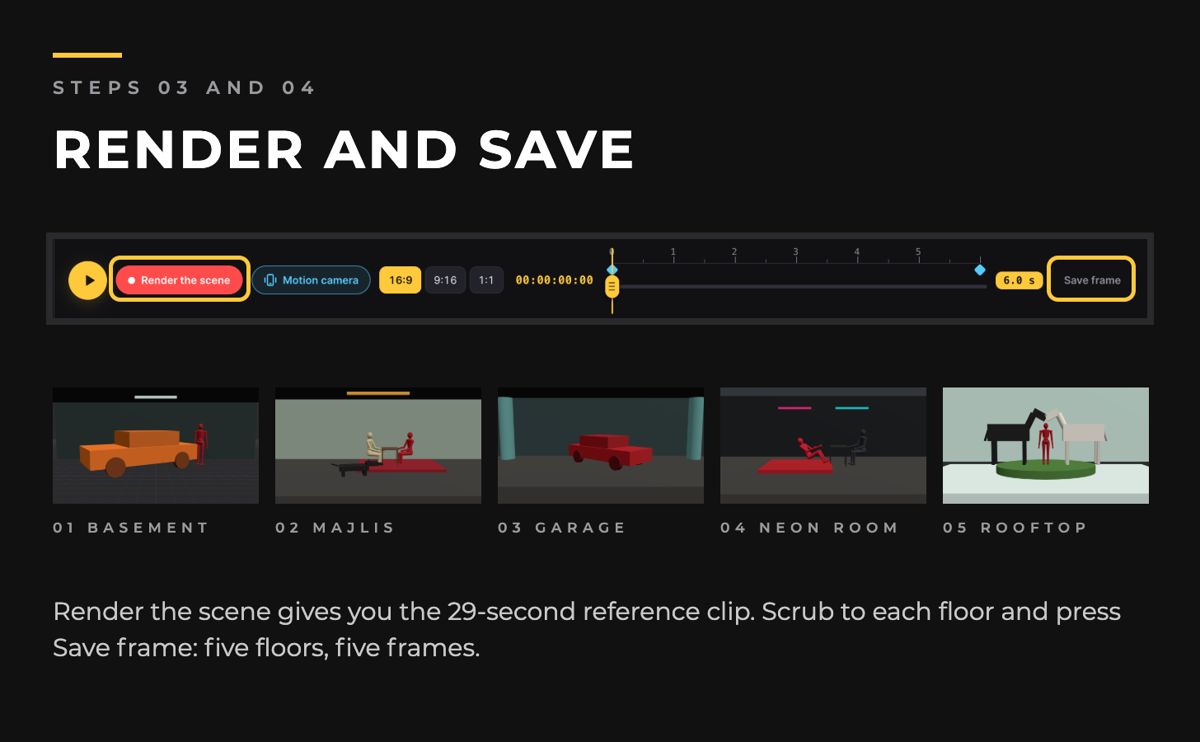
Press Render the scene. You get the 29-second reference clip as an MP4. This clip is the camera reference for Seedance: its path, framing and timing are what the final video follows.
Step 4: Save a frame on every floor
Scrub the timeline to the middle of each floor and press Save frame. Five floors, five frames. Each one becomes the reference for a photoreal still in the next step.
Step 5: Turn each frame into a photoreal still
Give the image model the saved frame and a prompt that names every grey stand-in and says what it really is. These are the five prompts we used with Seedream 5 Pro, at 16:9.
What we learned on the way. Our first attempts described each floor as a "cut-away, dollhouse cross-section", and the model added frames and concrete edges that weren't in the blockout. The versions we kept do three things differently:
- They open with "Recreate the reference frame exactly", and lock the camera position, the angle, the 35 mm field of view and the crop.
- They map each shape to its real thing: "the large grey stand-in vehicle on the left is a gleaming white Nissan Patrol".
- They say what not to add: "Do not add borders, frames, cut-away edges or extra walls that are not in the reference."
Floor 1: Basement
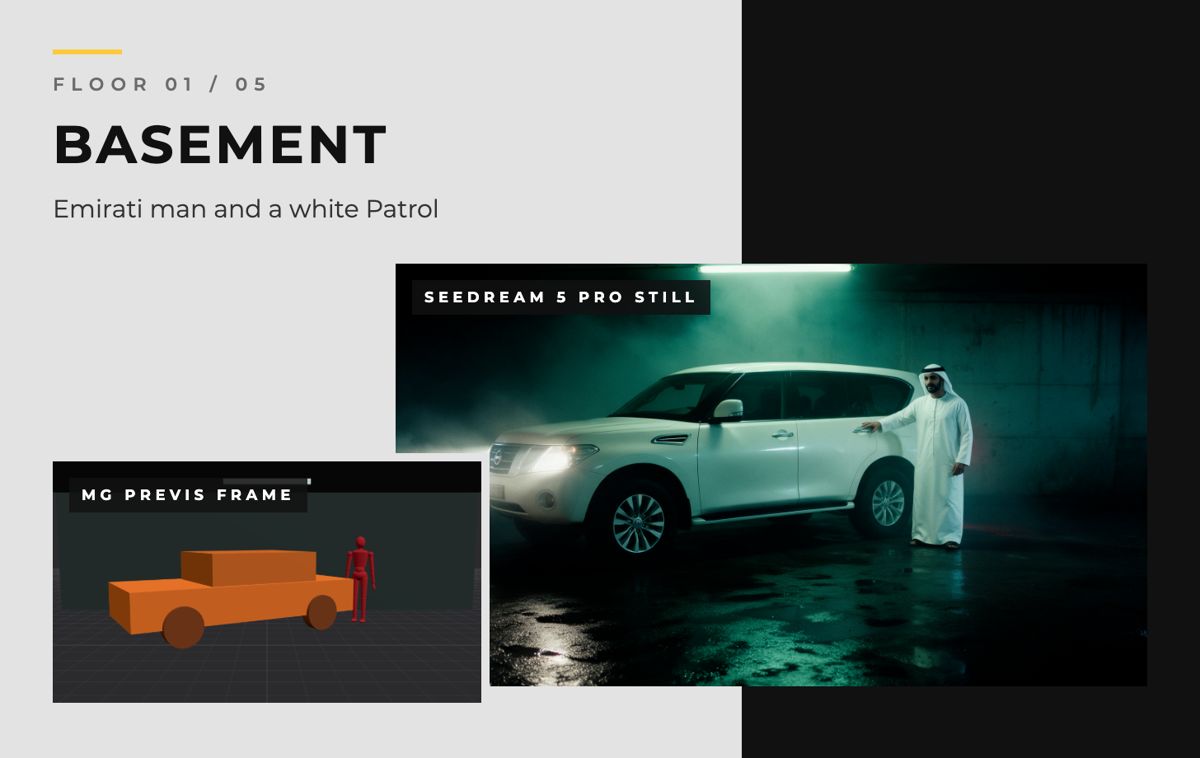
Recreate the reference frame exactly as a photoreal film still: identical camera position, eye-level angle, 35mm field of view and 16:9 crop; identical position, size, angle and proportions of every element. The large grey stand-in vehicle on the left is a gleaming white Nissan Patrol SUV, parked at the same angle, headlights blazing through haze. The white figure standing to its right is a young Emirati man in a crisp white kandura and white ghutra with black agal, standing with swagger, same height and spot in frame. The light bar at the top centre is a cold green fluorescent tube, mid-flicker.

The room is an underground concrete car park: dark teal concrete back wall, wet reflective floor, the dark band at the top of frame is a high shadowy ceiling fading into darkness. Thick haze gives real depth so the space feels open and atmospheric, not boxed in. Do not add borders, frames, cut-away edges or extra walls that are not in the reference.

Shot on ARRI Alexa 35 with a vintage 35mm Panavision Super Baltar lens, Kodak Vision3 500T film look pushed one stop. A bit grungy and raw: coarse visible film grain, halation glow around every light, slightly lifted milky blacks, gentle edge softness and vignette, grime and water stains on the concrete, imperfect real-world texture. Gulf music-video still: thick haze, the white kandura glowing against dirty concrete, punchy contrast. No text, no logos, no watermark.
Floor 2: Majlis
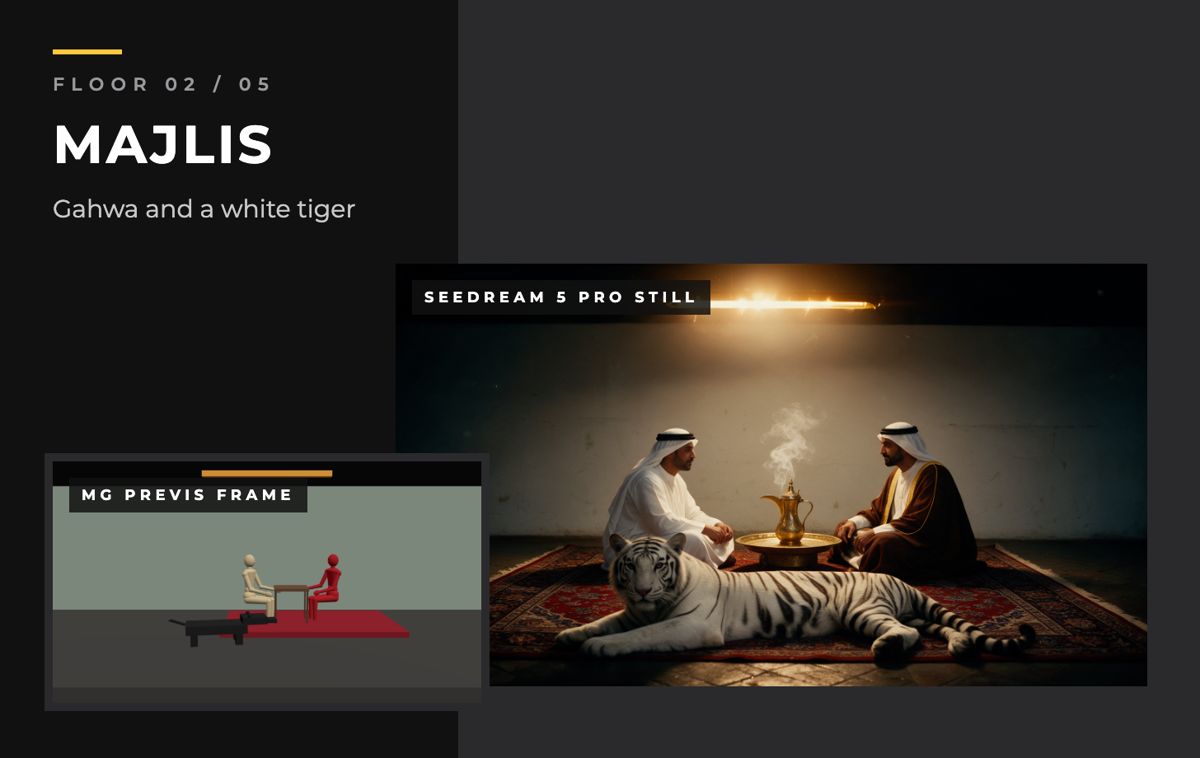
Recreate the reference frame exactly as a photoreal film still: identical camera position, eye-level angle, 35mm field of view and 16:9 crop; identical position, size, angle and proportions of every element. The red slab on the floor is a rich red Persian carpet. The white seated figure on the left is an Emirati man in a crisp white kandura and ghutra, sitting cross-legged; the brown seated figure on the right is an Emirati man in a brown gold-trimmed bisht, sitting cross-legged; the small table between them is a low brass tray and the gold bottle is an ornate brass dallah pouring Arabic gahwa, steam curling up. The pale animal lying across the front is a huge white tiger with black stripes, same position and size, staring straight into the lens. The orange bar at the top is a warm brass lamp, flickering.

The room is a traditional majlis: pale plaster back wall, warm lamplight, the dark band at the top of frame is a high ceiling fading into shadow. Haze and warm light give real depth so the space feels open and grand, not boxed in. Do not add borders, frames, cut-away edges or extra walls that are not in the reference.

Shot on ARRI Alexa 35 with a vintage 35mm Panavision Super Baltar lens, Kodak Vision3 500T film look pushed one stop. A bit grungy and raw: coarse visible film grain, halation glow around the lamp, slightly lifted milky blacks, gentle edge softness and vignette, worn scuffed plaster and a slightly faded carpet, imperfect real-world texture. Gulf music-video still: haze, rich golds and deep reds, punchy contrast. No text, no logos, no watermark.
Floor 3: Garage
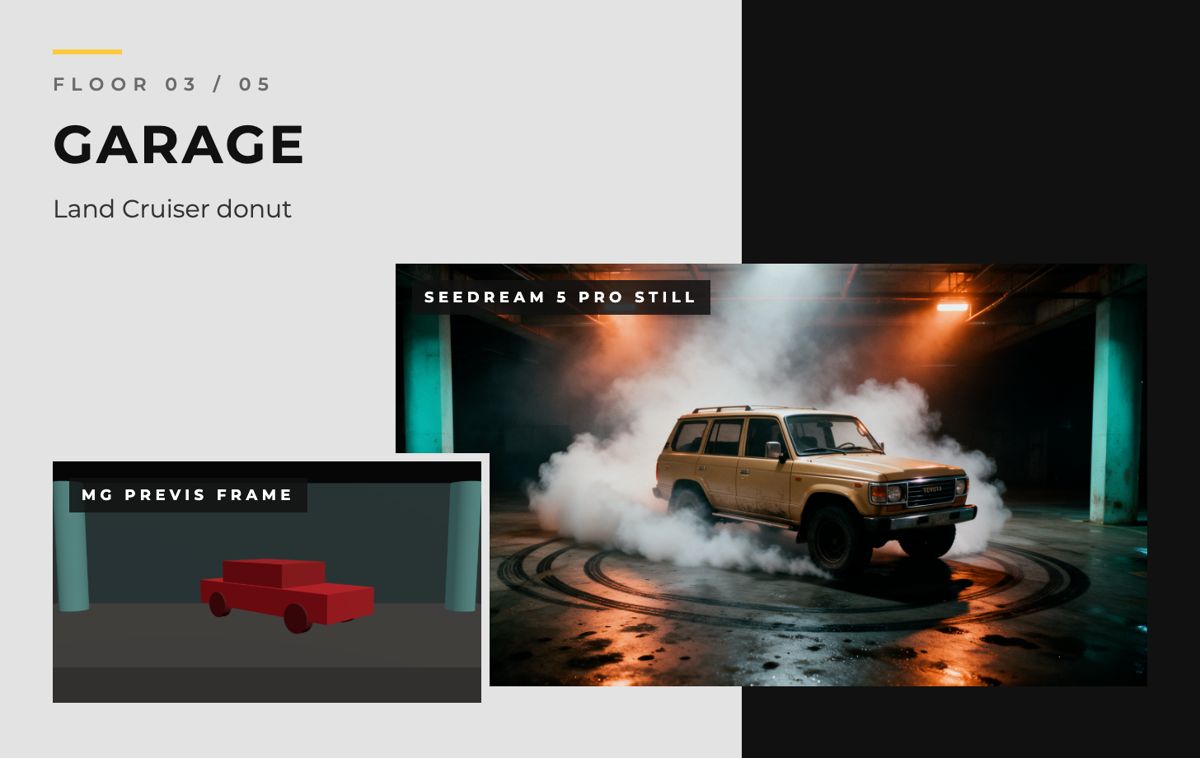
Recreate the reference frame exactly as a photoreal film still: identical camera position, eye-level angle, 35mm field of view and 16:9 crop; identical position, size, angle and proportions of every element. The sand-gold stand-in vehicle in the centre is a classic sand-gold Toyota Land Cruiser, stopped dead at exactly the same 45-degree angle, front corner toward the lens, a wall of white tyre smoke rolling around it, black tyre marks circling it on the floor. The two teal columns at the left and right edges are teal-lit concrete pillars in the same place.

The room is a concrete parking garage: dark back wall, wet reflective floor, the dark band at the top of frame is a high ceiling with warm orange lights strobing, fading into shadow. Smoke and haze give real depth so the space feels open and huge, not boxed in. Do not add borders, frames, cut-away edges or extra walls that are not in the reference.

Shot on ARRI Alexa 35 with a vintage 35mm Panavision Super Baltar lens, Kodak Vision3 500T film look pushed one stop. A bit grungy and raw: coarse visible film grain, halation glow around the orange lights, slightly lifted milky blacks, gentle edge softness and vignette, oil stains, grime and scuffed paint on the concrete, imperfect real-world texture. Gulf music-video still: thick smoke and haze, rich golds, punchy contrast. No text, no logos, no watermark.
Floor 4: Neon room
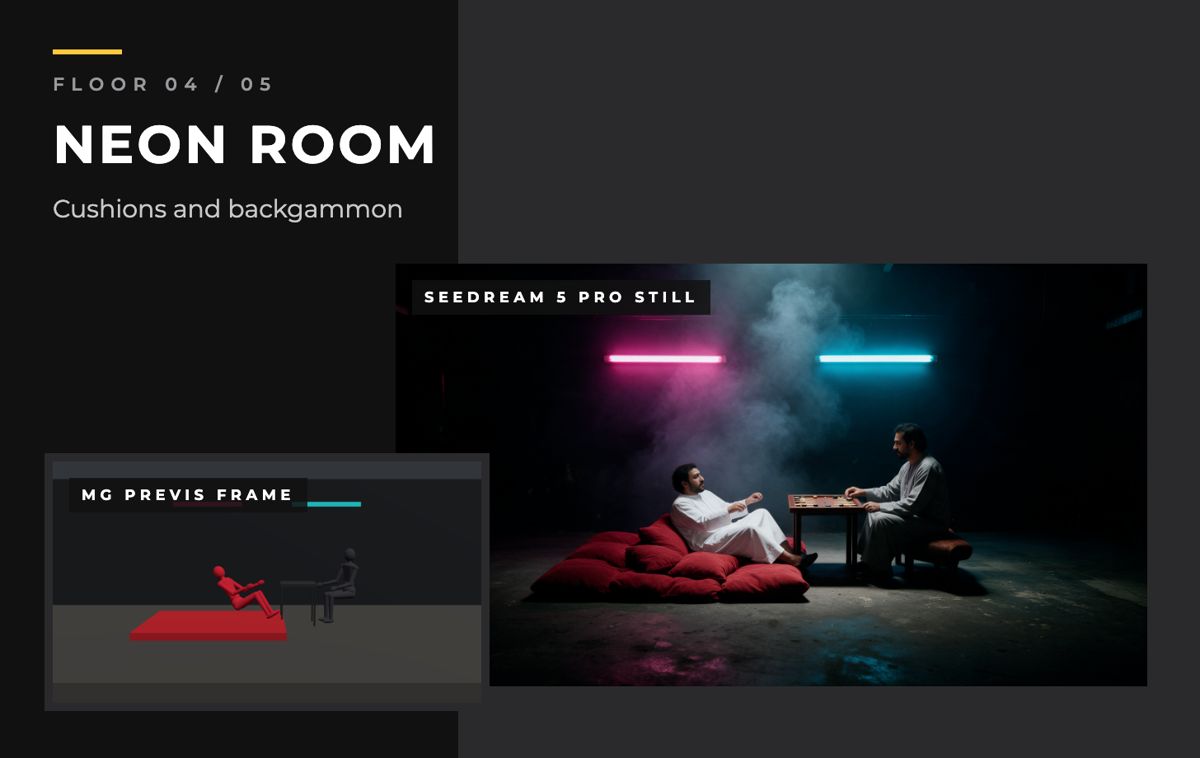
Recreate the reference frame exactly as a photoreal film still: identical camera position, eye-level angle, 35mm field of view and 16:9 crop; identical position, size, angle and proportions of every element. The dark red slab on the left is a spread of deep-red floor cushions; the white reclining figure on it is an Emirati man in a crisp white kandura, reclining lazily in the same pose. The small black table is a backgammon table with the board on it; the grey seated figure on the right is an Emirati man in a grey kandura slamming backgammon pieces down. The pink bar and cyan bar on the back wall are a hot-pink and a cyan neon tube in exactly those positions, both flickering.

The room is dark and black, concrete floor, the band at the top of frame is a high ceiling lost in darkness. Smoke curling through the neon gives real depth so the space feels open and moody, not boxed in. Do not add borders, frames, cut-away edges or extra walls that are not in the reference.

Shot on ARRI Alexa 35 with a vintage 35mm Panavision Super Baltar lens, Kodak Vision3 500T film look pushed one stop. A bit grungy and raw: coarse visible film grain, strong halation bloom around the neon, slightly lifted milky blacks, gentle edge softness and vignette, scuffed floor and stained walls, imperfect real-world texture. Gulf music-video still: smoke and haze, saturated neon bleeding into the smoke, punchy contrast. No text, no logos, no watermark.
Floor 5: Rooftop
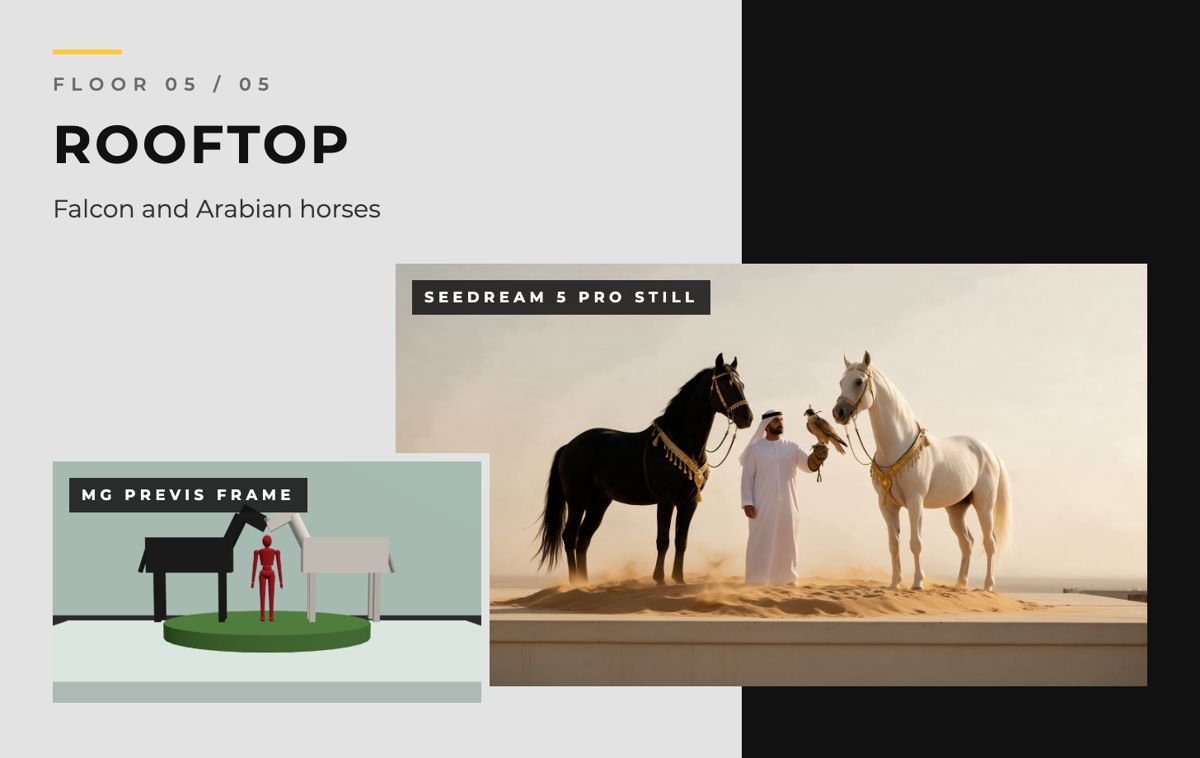
Recreate the reference frame exactly as a photoreal film still: identical camera position, eye-level angle, 35mm field of view and 16:9 crop; identical position, size, angle and proportions of every element. The round sand-coloured platform is a small island of golden sand on the rooftop, sand whipping in the wind. The white standing figure in the centre is an Emirati man in a crisp white kandura and ghutra with a hooded falcon on his raised gloved arm, same spot and height. The black horse on the left is a black Arabian horse in ornate gold tack and the white horse on the right is a white Arabian horse in ornate gold tack, same size, pose and placement.

The pale floor across the bottom is the concrete rooftop edge; the flat beige backdrop behind is a warm, hazy desert sky at golden hour with soft distant horizon, so the scene feels open and boundless, not boxed in. Do not add borders, frames, cut-away edges or walls that are not in the reference.

Shot on ARRI Alexa 35 with a 35mm Cooke S4 lens. Extreme high-budget Gulf music-video still: atmospheric haze, crisp white kandura, rich golds, punchy contrast, fine film grain. No text, no logos, no watermark.
Step 6: Generate with Seedance 2.5
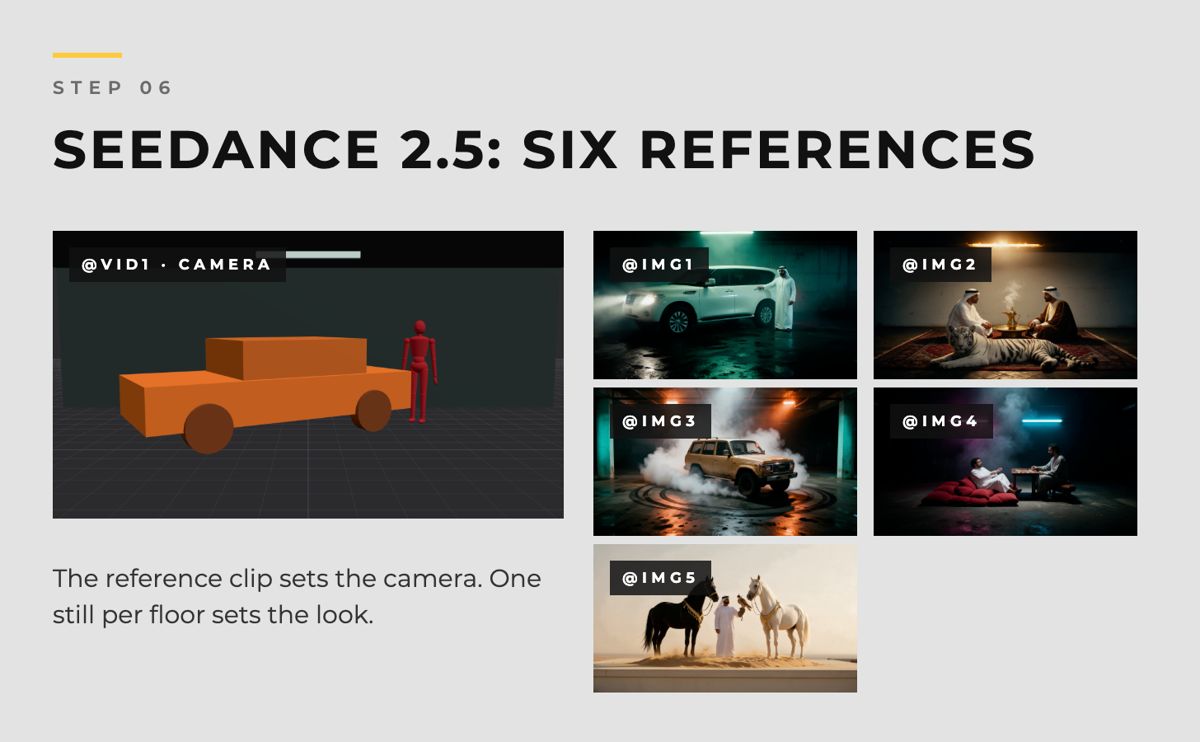
Seedance gets six references: the reference clip as @vid1, and the five stills as @img1 to @img5, in floor order. The clip sets the camera. The stills set the look of each floor.
Our settings: Seedance 2.5, 16:9, 29 seconds, 480p, no music. At 480p the 29-second take cost 6,960 Magnific credits.
The prompt has a fixed shape: a camera-reference rule, one line per image, the visual style, then the action on a timeline that matches the floors in the clip. Here it is in full:
No music, natural sound only.

EMIRATES , THE BUILDING. A 29-second horizontal 16:9 extreme, high-budget Gulf music video. One continuous unbroken take with no cuts: the camera cranes straight up through a concrete building in the UAE, rising past each thick concrete floor slab into the next level. The whole move is operated handheld with a subtle breathing sway and light micro-jitter. On every floor the practical lights flicker, strobe and buzz.

CAMERA REFERENCE: @vid1 is the camera reference. Match its camera path, framing, timing and handheld movement exactly. Take the look, people and setting from this prompt and the image references, never from the grey blockout.

IMAGE REFERENCES (one per floor, for look, wardrobe, set and lighting):
- Basement , Emirati man & white Patrol: @img1
- Majlis , gahwa & white tiger: @img2
- Garage , Land Cruiser donut: @img3
- Neon room , cushions & backgammon: @img4
- Rooftop , falcon & Arabian horses: @img5

VISUAL STYLE: Shot on ARRI Alexa 35 with a vintage 35mm Panavision Super Baltar lens, Kodak Vision3 500T film look pushed one stop. A bit grungy and raw: coarse visible film grain, halation glow around every light, slightly lifted milky blacks, soft edges and vignette, grime and texture on every surface. Thick haze on every floor, crisp white kanduras, rich golds and deep reds, punchy contrast.

ACTION , 29 SECONDS
[00:00-00:06.5] BASEMENT (Basement , Emirati man & white Patrol): a dark wet concrete car park under one cold green fluorescent tube that stutters on and off. The young Emirati man in a white kandura and ghutra slowly runs his hand along the door of the gleaming white Nissan Patrol, then turns his head and stares straight into the lens. The Patrol's headlights flare on through the haze; puddles ripple. Handheld: tense, slow creep forward.
[00:06.5-00:07] The camera cranes up past the concrete floor slab.
[00:07-00:13.5] MAJLIS (Majlis , gahwa & white tiger): under a flickering brass lamp, the man in the brown gold-trimmed bisht lifts the brass dallah and pours a thin stream of gahwa into a small cup, steam curling up; the man in white takes it with a slight nod. In front of them the white tiger slowly lifts its head, blinks once, stares into the lens and flicks its tail. Handheld: calm, gentle floating sway.
[00:13.5-00:14] The camera cranes up past the next slab.
[00:14-00:19.5] GARAGE (Garage , Land Cruiser donut): the sand-gold Toyota Land Cruiser tears in and spins one violent full 360-degree donut, tyres screaming, sparks flying, a wall of white tyre smoke exploding outward, then stops dead at a 45-degree angle to the camera, engine growling, rocking on its suspension. Orange ceiling lights strobe through the smoke. Handheld: rougher, shaken by the engine, the operator flinching slightly as the smoke hits.
[00:19.5-00:20] The camera cranes up past the next slab.
[00:20-00:24.5] NEON ROOM (Neon room , cushions & backgammon): pink and cyan neon tubes flicker in the black room. The man in white lounges back on the red cushions, lazily flicking prayer beads; the man in grey rolls the dice, slams a backgammon piece down hard, then looks up at him. Smoke drifts and swirls through the coloured light. Handheld: loose, lazy drift.
[00:24.5-00:25.5] The camera cranes up past the roof edge.
[00:25.5-00:29] ROOFTOP (Rooftop , falcon & Arabian horses): warm dusty golden haze, sand whipping across the sand island in a strong wind. The black Arabian horse on the left rears up high on its hind legs, front hooves kicking the air, mane and tail flying, sand bursting from under it, then lands. The Emirati man stands his ground and raises his gloved arm; the falcon spreads its wings and settles. The white Arabian horse on the right tosses its head and shakes its mane, gold tassels swinging. Handheld: buffeted by the wind, slow creep forward to end.

Background structure is static: walls, floors, slabs and ceilings do not move. Ambient elements (haze drifts, smoke rolls, steam curls, lights flicker, sand blows) have natural motion.

CAMERA: One continuous vertical crane move, centred and front-on, eye level on each floor, 35mm lens, 16:9, 29 seconds. Handheld throughout with a subtle organic sway matching the camera reference. No cuts.

AUDIO: No music, no speech. Only: the crackle and buzz of flickering lights throughout, a V8 idling and dripping water in the basement, gahwa pouring and a low tiger growl, a screaming engine, screeching tyres and sparks, dice rattling and a backgammon piece slamming, then howling desert wind, a falcon's bell and a horse's whinny as it rears.

CONTINUITY AND QUALITY: One unbroken take. Each floor keeps the look, people and lighting of its image reference. No grey mannequins, no untextured blockout shapes, no floor grid, no morphing, no extra limbs, no subtitles, no text overlays, no watermarks, no interface elements.

Handheld ARRI Alexa 35 music-video film. Lighting and cinematography are masterful and expertly accomplished.
Two things make this prompt work with the reference clip:
- The timeline matches the clip. Each floor's time range in the prompt is when the camera is actually on that floor in the reference clip, and each slab crossing gets its own short beat.
- The clip is for the camera only. The prompt says twice not to take anything from the grey blockout, so no mannequins or grid end up in the video.
The result
Same camera, same framing, same timing, on every floor.
Try it
Everything in this tutorial is free in PREVIS during the open beta: building, rendering clips, saving frames, shot prompts and Add MCP. Sign in with Google, Facebook or email. No card is asked for.
Open the app: madgeniusprevis.com
More guides
- A Blender alternative for Seedance
- Seedance camera control
- Previs for AI video
- How to block out a shot for AI video
- 3D MCP: control a 3D scene from your AI
- A Blender MCP alternative
- Model in 3D with Claude
- How to use reference videos in Seedance
- Free previs software
- Camera move library
- Tutorials with every prompt