
How we made a one-take shot from his eye to 90 metres over New York (every prompt included)
One continuous 30-second take. It starts on a man's eye, flies back off a Manhattan rooftop, climbs 90 metres above the city, spirals back down around him and lands on a medium. We never touched 3D software. We talked to an AI over MCP, and it built the whole thing in Mad Genius PREVIS.
Ask a video model for this in plain words and you get a guess: a cut where you wanted a climb, a different roof on the way down, a man who stops facing the lens. The move has too many beats for a text prompt to hold. A 3D blockout fixes that, but most people don't know Blender and don't want to learn it. You don't need to. Connect your AI to PREVIS over MCP and describe what you want. It places the set, keyframes the camera, looks at its own frames and fixes what's off. You direct in plain English, then give Seedance the grey clip to follow.
We used Claude. Any LLM or AI app that takes MCP connectors works the same way.
This post is the whole pipeline, step by step, with every prompt exactly as we used it, including the first attempts we threw away.
Tools: Your AI over MCP (we used Claude; it does the 3D work while you talk), Mad Genius PREVIS (where the scene gets built, free during the open beta), Nano Banana 2.1 (photoreal stills), ElevenLabs (the voice, Chris), Seedance 2.5 (the video). The image and video models were run on Magnific.
Step 1. Connect your AI to PREVIS
No 3D skills from here on. This is the part that replaces Blender.
- Open the app at madgeniusprevis.com/app and sign in.
- Press Add MCP (top right) and copy your private link.
- Add it to your AI as a custom connector. We used Claude, but any LLM or AI app that takes MCP connectors works.
Keep the PREVIS tab open. Your AI builds in it while you watch.
Step 2. Talk the set into existence
Describe the place the way you'd describe it to a crew. In short, ours was:
A New York rooftop, a street, the city all round it, one amber man.
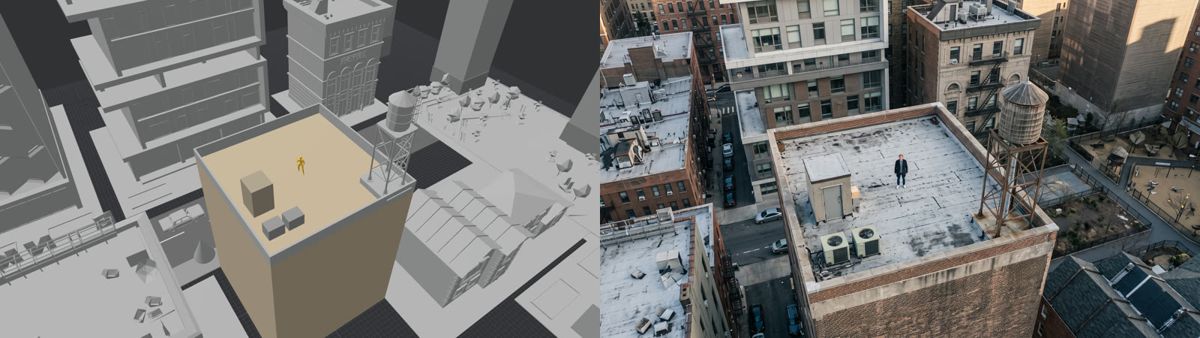
Claude built a five-storey building with a parapet, a water tank, AC units and a roof door, a street with cars and trees, neighbouring blocks, and New York towers around the edge. We didn't place a single box. When something was wrong we just said so, the same way you'd give a note.
You don't need a detailed city. You need what the camera will see, at the right size. The building is 15 metres tall and the roof is 12 metres across, so the image and video models get the scale right later.
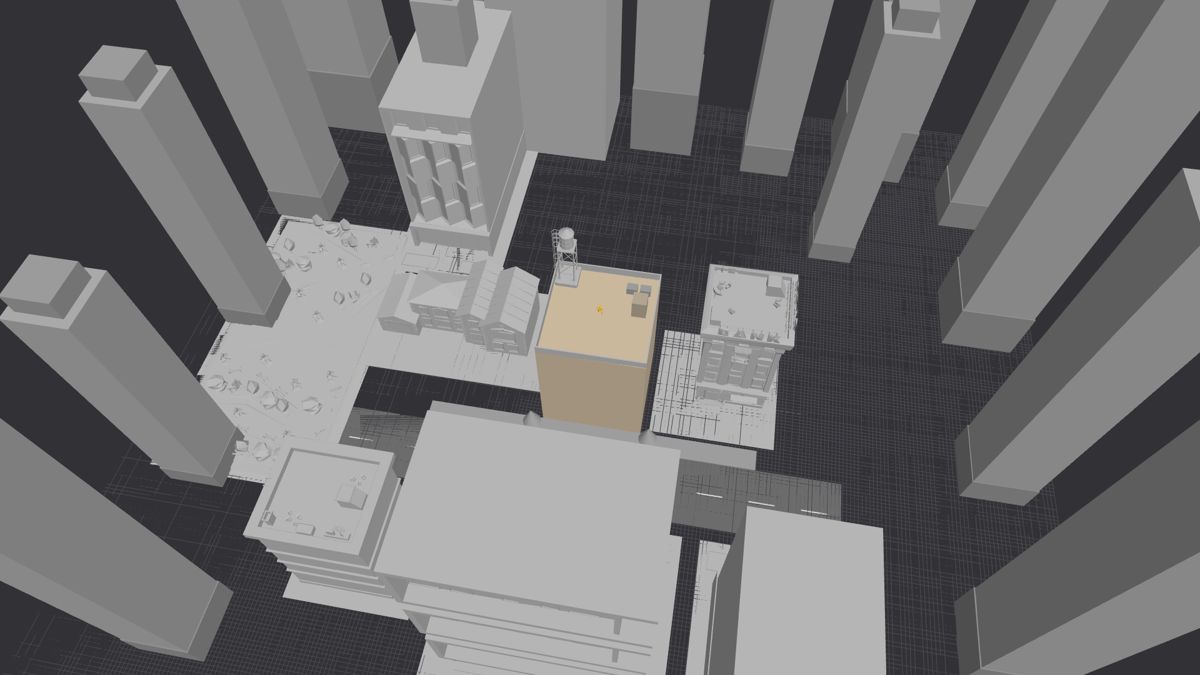
Step 3. Talk the camera through the shot
This is the part a text prompt to a video model can't hold, and the part that normally takes keyframing skill. Instead, we described the move:
Start on his eye. Fly back off the roof. Climb to ninety metres. Spiral down, each turn lower and slower, and land on a medium.
Then we gave notes as we watched it. When the camera flew through a building, we said so and it went over the top. From fifteen seconds, orbit him. Slow it down. End on a medium. That became these 13 keyframes. You'll never need to type this table. It's here so you can see what the AI did:
| Time | Height | Lens | Beat |
|---|---|---|---|
| 0 s | 16.6 m | 85 mm | On his eye |
| 1.2 s | 16.6 m | 60 mm | Pulling back |
| 3.5 s | 16.4 m | 32 mm | Full figure, walking at us |
| 5.5 s | 17.5 m | 28 mm | Over the parapet |
| 8 s | 36 m | 24 mm | Out over the street |
| 12.5 s | 90 m | 24 mm | The top |
| 15 s | 50 m | 24 mm | Orbit begins |
| 17 s | 38 m | 24 mm | Orbit |
| 19 s | 28 m | 24 mm | Orbit, tighter |
| 21.5 s | 22 m | 26 mm | Past the water tank |
| 24 s | 18.5 m | 28 mm | Roof height, slowing |
| 27 s | 16.7 m | 36 mm | Nearly there |
| 30 s | 16.5 m | 45 mm | Waist-up medium |
Keep him facing us. One more note: he turns to face us. The mannequin walks in on a walk clip, stops at the middle of the roof and switches to a talking clip. His turn was keyed from 7° to 360° between 12.5 s and 27 s, so he rotates on the spot as the camera circles.
Step 4. Save the grey frames
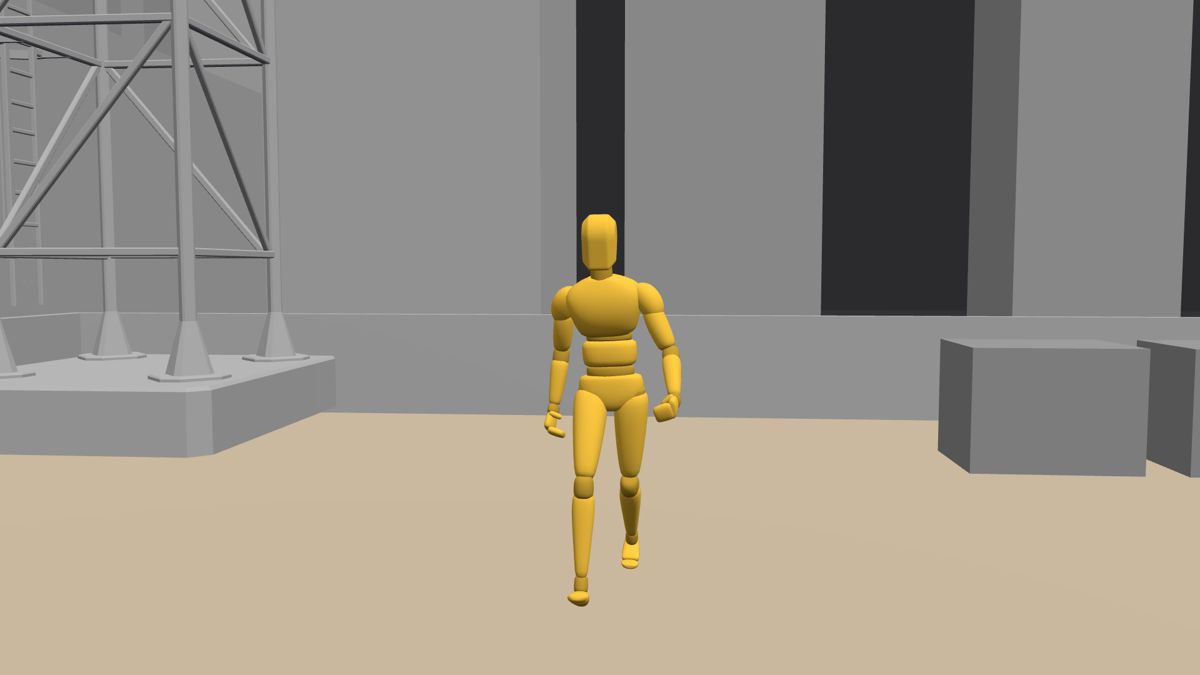
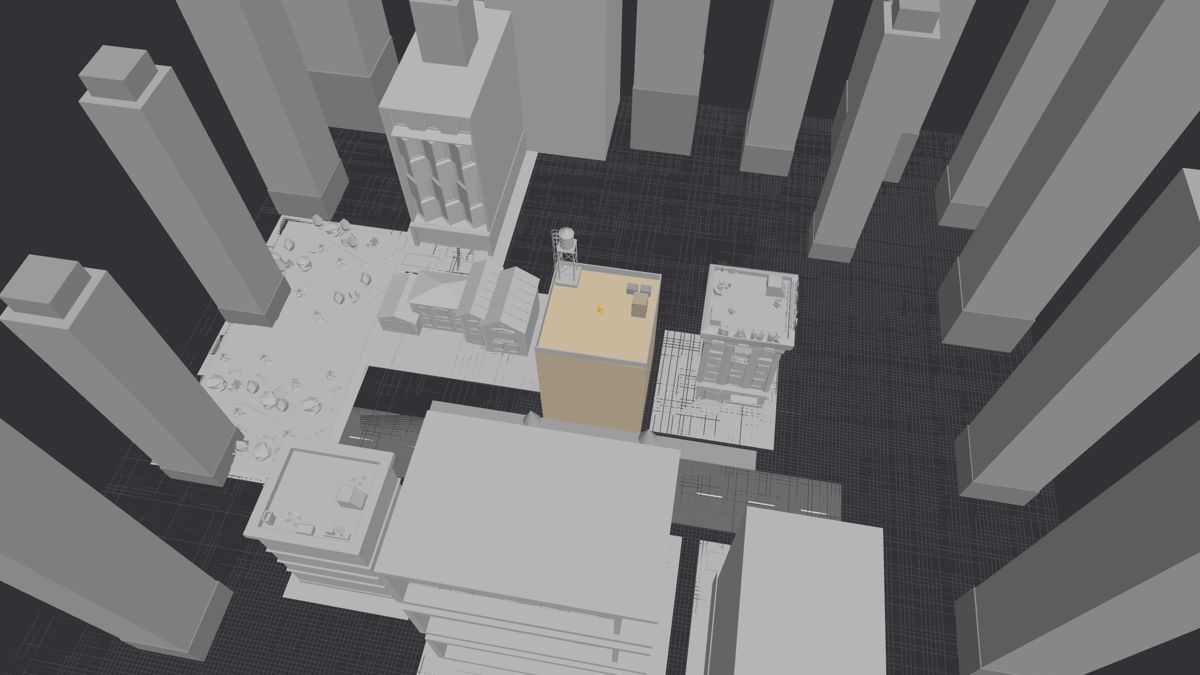
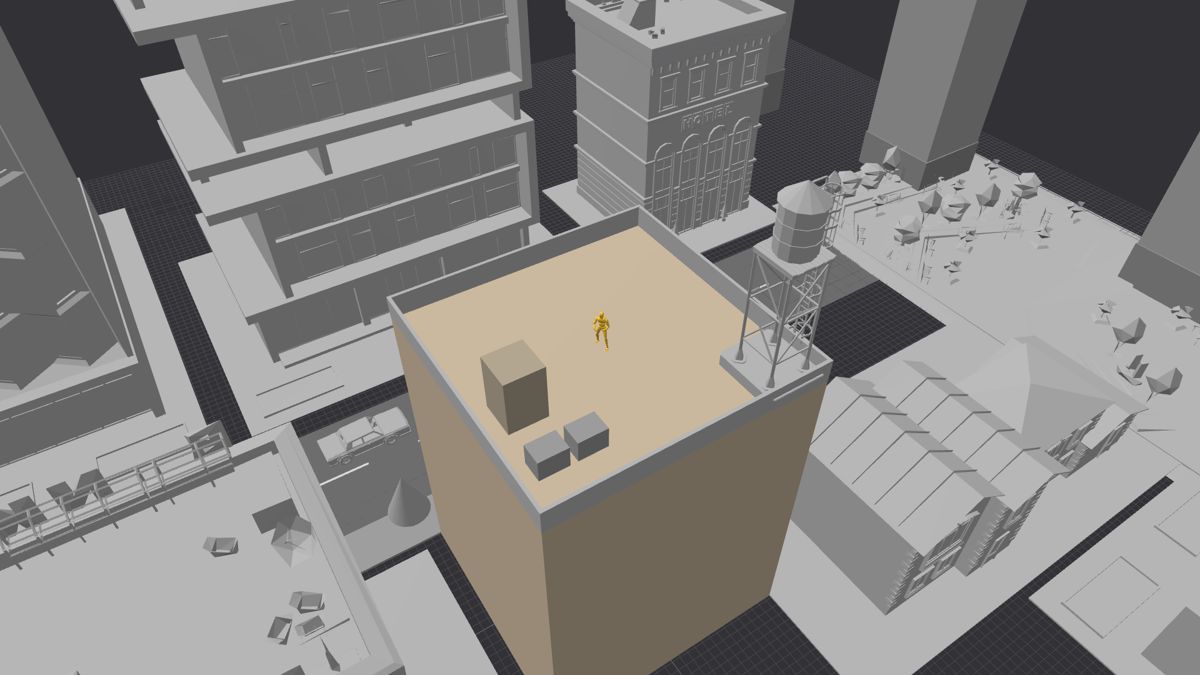
Press Save frame at the beats you want as stills, or ask your AI to save them. We saved five: 0 s, 3.1 s, 4.2 s, 13 s and 17.4 s.
Step 5. Find the look
We ran the grey frames through an image model. The first pass was too glossy, so we stripped it back. This is the same step twice, and the difference is worth seeing.
First try, thrown away (Seedream 5 Pro, the 0 s frame as the reference). Dramatic sunrise, ARRI, anamorphic, heavy grade. It looked like an AI image:
Use the reference image only for the camera angle, framing and composition. Turn this grey 3D blockout into a real photograph. Extreme close-up of a cool New Yorker man in his early 30s: blond swept-back hair, light stubble, sharp blue eyes, black wool overcoat over a charcoal crew-neck, looking straight into the lens with a slight knowing smile. He is on a Manhattan rooftop at a dramatic sunrise, the low golden sun rim-lighting his hair and cheek, the out-of-focus city skyline glowing orange and blue behind him. Shot on ARRI Alexa 35 with an anamorphic lens, shallow depth of field, cinematic colour grade, fine film grain. No text, no logos.
The keeper (Nano Banana 2.1, the 3.1 s frame as the reference). Ordinary, documentary, no grade:
Use the reference image only for the camera angle, framing, composition and the position of the figure, the roof and the buildings. Turn this grey 3D blockout into an ordinary, believable photograph, as if a crew shot it for real. The amber mannequin becomes a New Yorker man in his early 30s: blond hair, a little messy, light stubble, a dark overcoat over a grey crew-neck, jeans, white sneakers, walking toward the camera across a plain tar rooftop and talking to the lens, relaxed and natural. Low brick parapet at the roof edge, real Manhattan buildings behind him with ordinary detail: windows, fire escapes, water tanks. Early-morning sunrise light, soft and low, a gentle warm tone on one side of his face, a pale sky, no haze effects. Shot on a Sony FX6 with a 35mm prime, natural colour, true-to-life contrast, realistic skin texture and pores. Understated, documentary realism: no lens flare, no glow, no HDR, no oversaturated sky, no heavy grade. No text, no logos.
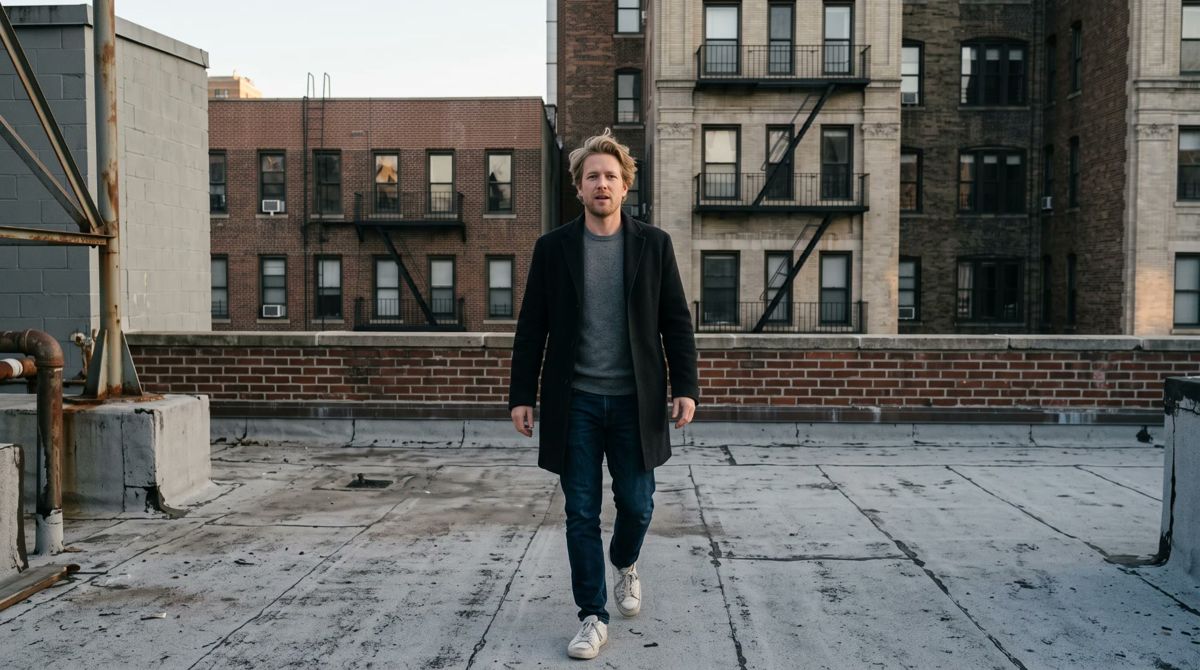
Step 6. Lock the man with a character sheet
From that still we made a turnaround sheet, so he stays the same man all the way through. Nano Banana 2.1, with the still as the reference. Here's the prompt exactly as we ran it, placeholders and all. It's a template, and the reference image fills in the blanks:
**Professional character reference turnaround sheet, 3-panel split triptych composition on solid neutral studio gray background. use the black dress for the full body**
**[LEFT PANEL]:**Front-facing body view of the lady wearing [Clothing Details], [Accessory Details],**the head and face are completely omitted and replaced by a solid black silhouette shape**, emphasizing casual posture and clothing drape.
**[CENTER PANEL]:**Back-facing body view showing [Details of Back/Hair/Shoulders] and [Posture Details], with the subject facing away from the camera.
**[RIGHT PANEL]:**Large detailed close-up portrait headshot of [Subject Name], [Facial Features], [Expression/Mood], [Eye Contact Style], neutral studio lighting, 85mm portrait lens, shallow depth of field.
**Clean studio lighting, ultra-high resolution, photorealistic, no text, no watermarks, no labels.**
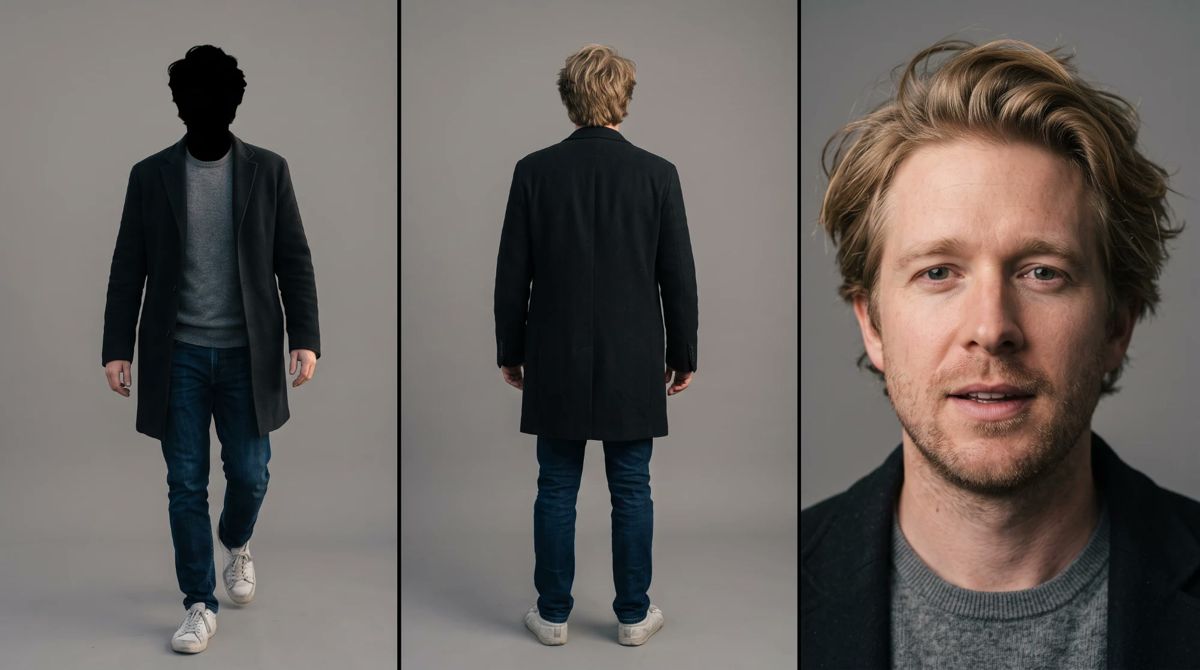
Step 7. Make every grey frame real
Now each still gets three references: @img1 the grey frame for the layout, @img2 the man, @img3 the look. All Nano Banana 2.1, 2K.
The close-up (0 s):
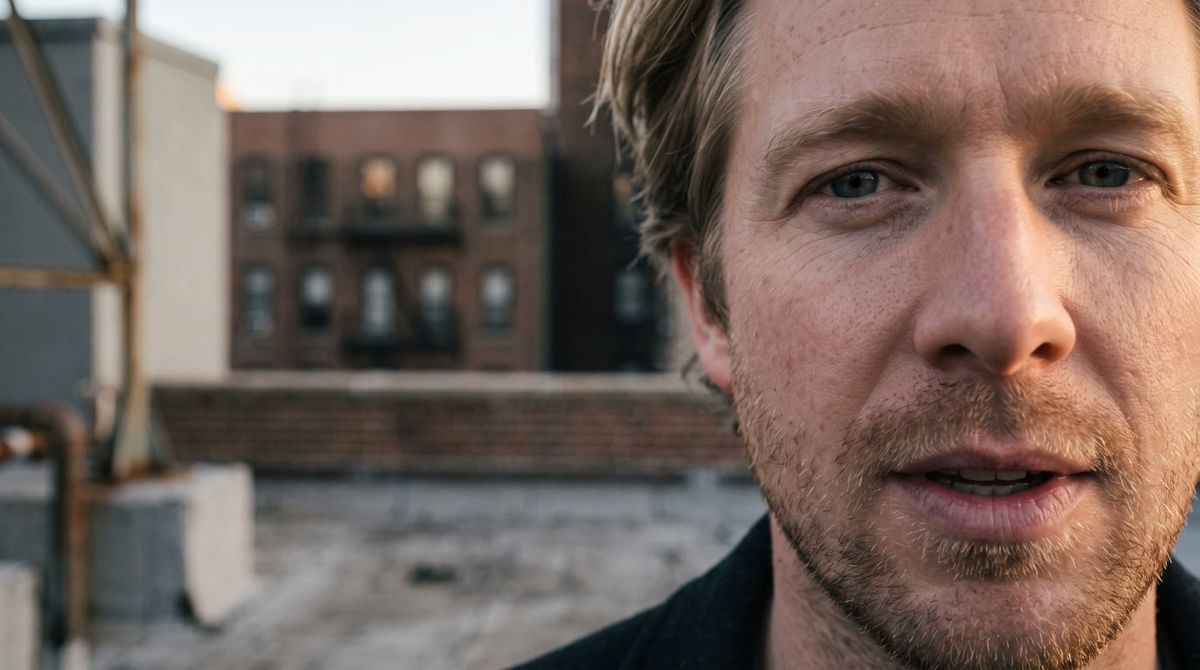
@img1 is the layout: copy only its camera angle and framing, an extreme close-up of his face. @img2 is the man: match his face, blond messy hair, stubble, dark overcoat and grey crew-neck exactly. @img3 is the look: match its natural colour, soft early-morning light, contrast and realism. Extreme close-up of him on a New York rooftop, looking straight into the lens mid-sentence, relaxed, the soft low sunrise light warm on one side of his face, the rooftop and brick buildings softly out of focus behind him. Shot on a Sony FX6, natural colour, realistic skin texture. No lens flare, no glow, no HDR, no heavy grade. No text, no logos.
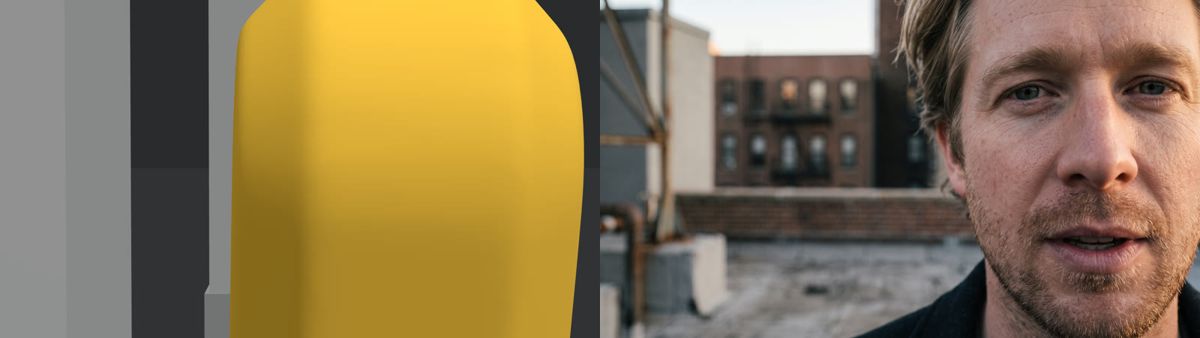
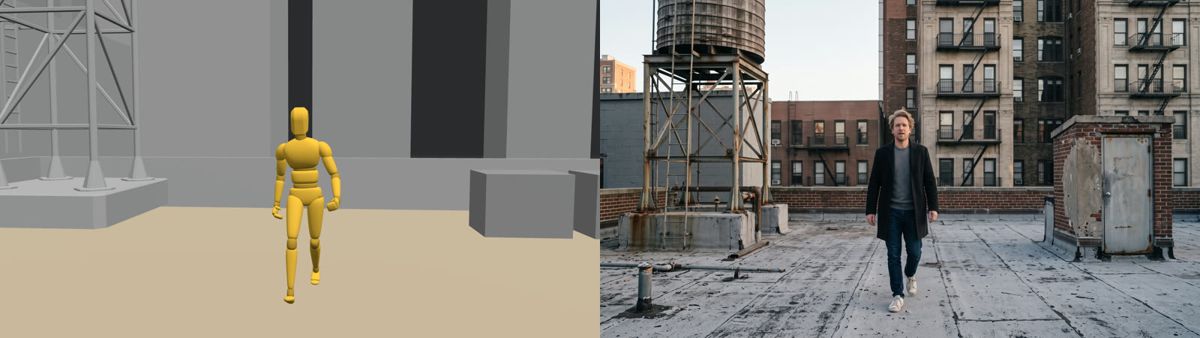
The rooftop (4.2 s):
@img1 is the layout: copy only its camera angle, framing and where the man, the roof edge, the water tank, the stairwell hut and the buildings sit. @img2 is the man: match his face, blond messy hair, dark overcoat, grey crew-neck, jeans and white sneakers exactly. @img3 is the look and the place: match its natural colour, soft early-morning light, tar roof, brick parapet and New York buildings. Wide shot of him walking toward the camera across the flat rooftop, talking to the lens, an old wooden New York water tank on a steel stand and a small stairwell hut on the roof, ordinary Manhattan buildings around. Shot on a Sony FX6 with a 24mm prime, natural colour, true-to-life contrast. No lens flare, no glow, no HDR, no heavy grade. No text, no logos.
The high aerial (13 s):
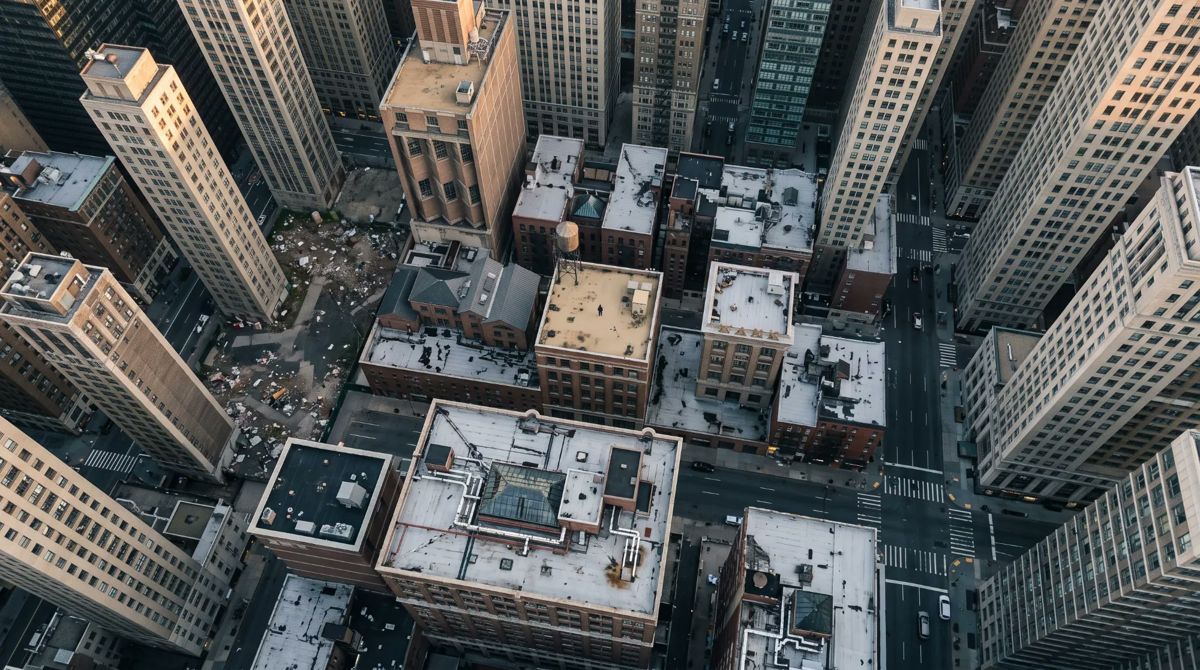
@img1 is the layout: copy only its high aerial angle and the layout of streets, rooftops and towers. @img3 is the look: match its natural colour, soft early-morning light and realism. @img2 is the man, seen tiny from far above. A real aerial photograph of Manhattan just after sunrise, high above the rooftops: dense streets, brick and stone buildings, water tanks, Midtown towers rising around, low soft sunlight on the tops of the towers and long gentle shadows. The tan-roofed five-storey building in the middle has the small figure of the man in a dark overcoat standing on it. Shot from a drone, natural colour, true-to-life contrast. No lens flare, no glow, no HDR, no oversaturated sky. No text, no logos.
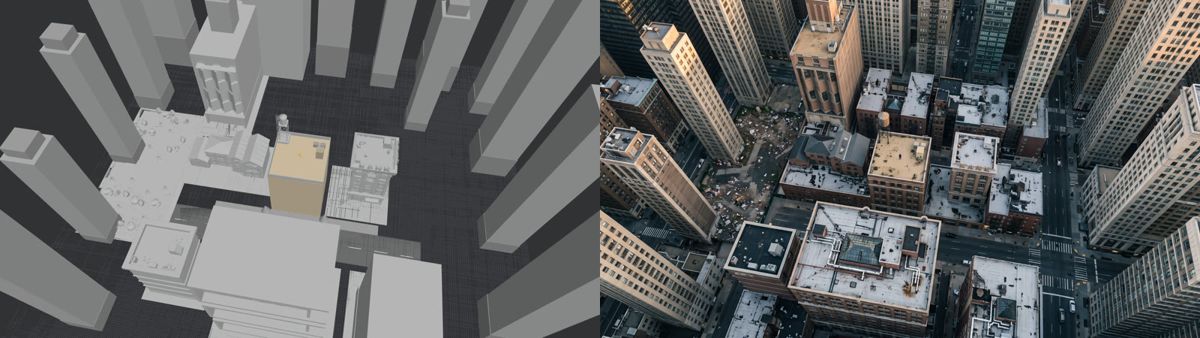
The way down (17.4 s). Our first version made him too big, so we ran it again with the true scale written out. This is the second prompt:
@img1 is the layout: copy its camera angle, framing and where the man, the roof, the water tank, the stairwell hut and the buildings sit, and keep the man exactly as small as the amber figure is in it. @img2 is the man: match his blond hair, dark overcoat, grey crew-neck, jeans and white sneakers. @img3 is the look and the place: match its natural colour, soft early-morning light, tar roof, brick parapet and New York buildings. Real aerial drone photograph, about 30 metres above and to the side, looking down at a flat Manhattan rooftop. TRUE SCALE: the roof is 12 metres across and the man is an ordinary 1.8 metre person, so he is small in frame, about one seventh of the roof's width. The wooden water tank on its steel stand is about four times his height, the stairwell hut is taller than him, the roof door is taller than him and each AC unit comes up to his waist. He stands on the roof facing up toward the camera. Neighbouring rooftops, streets and towers around at their real size. Natural colour, true-to-life contrast. No lens flare, no glow, no HDR, no heavy grade. No text, no logos.
Step 8. Record the voice first
Seedance 2.5 takes an audio reference, so the voice goes in before the video exists. That locks the timing and gives you lip sync. We used the ElevenLabs voice Chris and rendered one 30-second take, the same length as the shot, so each line lands on its part of the move. This file goes into Seedance as @audio1. The lines:
This close, a camera fogs up. This far? It needs a helicopter. This high, it needs a permit, a pilot... and a lot of luck. Coming back down? That's a whole different crew. One take. No crew. No helicopter. Just a camera that can go anywhere, planned before anyone leaves the office. This whole shot? Blocked in Mad Genius pree-viz.
Spell PREVIS as "pree-viz" for any AI voice.
Step 9. Generate
Render the grey clip with Render the scene (your AI can do this too), set Export for to Seedance 2.5, and copy the shot prompt as your starting point. In Seedance 2.5 (Pro, 30 seconds, sound on) attach six references:
@vid1, the camera. The grey clip you rendered. This is the move Seedance follows.
@img1, the man. The character sheet from Step 6.
@img2, the opening close-up. The eye still from Step 7.
@img3, the place and the look. The keeper still from Step 5.
@img4, the top of the move. The high aerial from Step 7.
@audio1, his voice. The 30-second recording from Step 8. Listen to it here, then attach yours the same way:
This is the vertical prompt, exactly as we ran it. For 16:9, change "Vertical 9:16 frame" to "Horizontal 16:9 widescreen frame" and the framing words to match.
No music, natural sound only. Vertical 9:16 frame.

REFERENCES: @vid1 is the camera move: follow its path, timing, speed and vertical framing exactly, one continuous take with no cuts. It is a grey blockout; the amber mannequin in it is the man. @img1 is the man: same face, messy blond hair, light stubble, dark wool overcoat, grey crew-neck, dark jeans, white sneakers, in every frame. @img3 is the place and the look: the tar rooftop, brick parapet, New York brick buildings with fire escapes, soft early-morning light, natural colour. @img2 is the opening close-up of his face. @img4 is the high view over Manhattan at the top of the move.

VOICE: @audio1 is his voice and the exact dialogue with its timing. Use this recording as he speaks; do not invent a different voice or change the words. Lip-sync his mouth to it whenever his face is in frame. He talks straight to the lens like a friendly vlogger, relaxed, warm, a slight smile. The words, for reference: "This close, a camera fogs up. This far? It needs a helicopter. This high, it needs a permit, a pilot... and a lot of luck. Coming back down? That's a whole different crew. One take. No crew. No helicopter. Just a camera that can go anywhere, planned before anyone leaves the office. This whole shot? Blocked in Mad Genius pree-viz."

CAMERA AND LENSES: Shot on a Sony FX6 full-frame cinema camera with Sony G Master lenses, S-Cinetone colour, 24 fps, 180-degree shutter. The same camera stays on for the whole take: handheld at the start, then flown on a heavy-lift cinema drone. The focal length changes smoothly during the move, as a zoom would, with no jumps.

ACTION:
0–4 seconds , HANDHELD OPEN: Handheld FX6 on the Sony FE 90mm f/2.8 G Master macro, wide open, very shallow focus, slight natural shake and breathing, like a vlogger's operator walking backward in front of him. It starts on an extreme close-up of his eye and face, then pulls back and zooms out through 60mm to about 32mm (Sony FE 24-70mm f/2.8 G Master II) as he walks toward the lens across the rooftop, talking: "This close, a camera fogs up."
4–8 seconds , THIS FAR: 28mm, f/4. The shake smooths out into a weightless move. The camera keeps flying backward over the brick parapet, off the edge of the roof and out over the street, rising as he becomes a small figure on the roof: "This far? It needs a helicopter."
8–13 seconds , THIS HIGH: 24mm, f/5.6, deep focus. It climbs high above Manhattan until the streets, rooftops and towers spread out below in the low morning sun: "This high, it needs a permit, a pilot... and a lot of luck."
13–20 seconds , COMING BACK DOWN: 24mm, f/5.6. From high above, it starts circling his building in a wide orbit, descending, the skyline wheeling past, while he turns on the spot to keep facing the lens: "Coming back down? That's a whole different crew."
20–26 seconds , THE SPIRAL: 26mm widening to 28mm, f/4. The orbit tightens and drops past the wooden water tank to roof height, slowing all the time: "One take. No crew. No helicopter. Just a camera that can go anywhere,"
26–30 seconds , THE BUTTON: zooms in from 36mm to 45mm, f/2.8, the background softening. The orbit eases to a gentle stop in front of him in a steady waist-up medium shot: "planned before anyone leaves the office. This whole shot? Blocked in Mad Genius pree-viz." He holds the look into the lens with a small smile.

SOUND: his voice from the recording, close and clear throughout, over rooftop breeze and distant New York traffic, open street ambience, high wind at the top, wind whooshing as the camera circles down, then the rooftop breeze again. No music.

Buildings, roof, parapet and water tank are solid and static; only the camera and the man move. Same man, same clothes, same rooftop from start to end. No text, no logos, no subtitles. Hands with five fingers.

Handheld vlog realism in the first four seconds, then smooth weightless drone work, Sony FX6 with G Master glass, natural colour, true-to-life contrast, no lens flare, no heavy grade. Lighting and cinematography are masterful and expertly accomplished, but slow and deliberate.
What it does and doesn't do
It follows the move, not every box. Our grey roof and the rooftop Seedance made aren't the same roof, and the city is its own invention. That's the trade: plan the camera, and let the AI invent the rest. If the move holds, the shot holds.
Try it. Mad Genius PREVIS runs in your browser. Press Add MCP, connect your AI and talk to your scene. No Blender, no 3D skills. It's free during the open beta, with everything unlocked and no card needed.
More guides
- A Blender alternative for Seedance
- Seedance camera control
- Previs for AI video
- How to block out a shot for AI video
- 3D MCP: control a 3D scene from your AI
- A Blender MCP alternative
- Model in 3D with Claude
- How to use reference videos in Seedance
- Free previs software
- Camera move library
- Tutorials with every prompt